Your private photos and videos, in your keeping.
An encrypted library you can browse and watch like any photo library. Klenod doesn't write decrypted copies to disk while you watch, and if you ever want to leave, you can export everything.
One email when the Mac app is ready. No tracking. How we handle it.

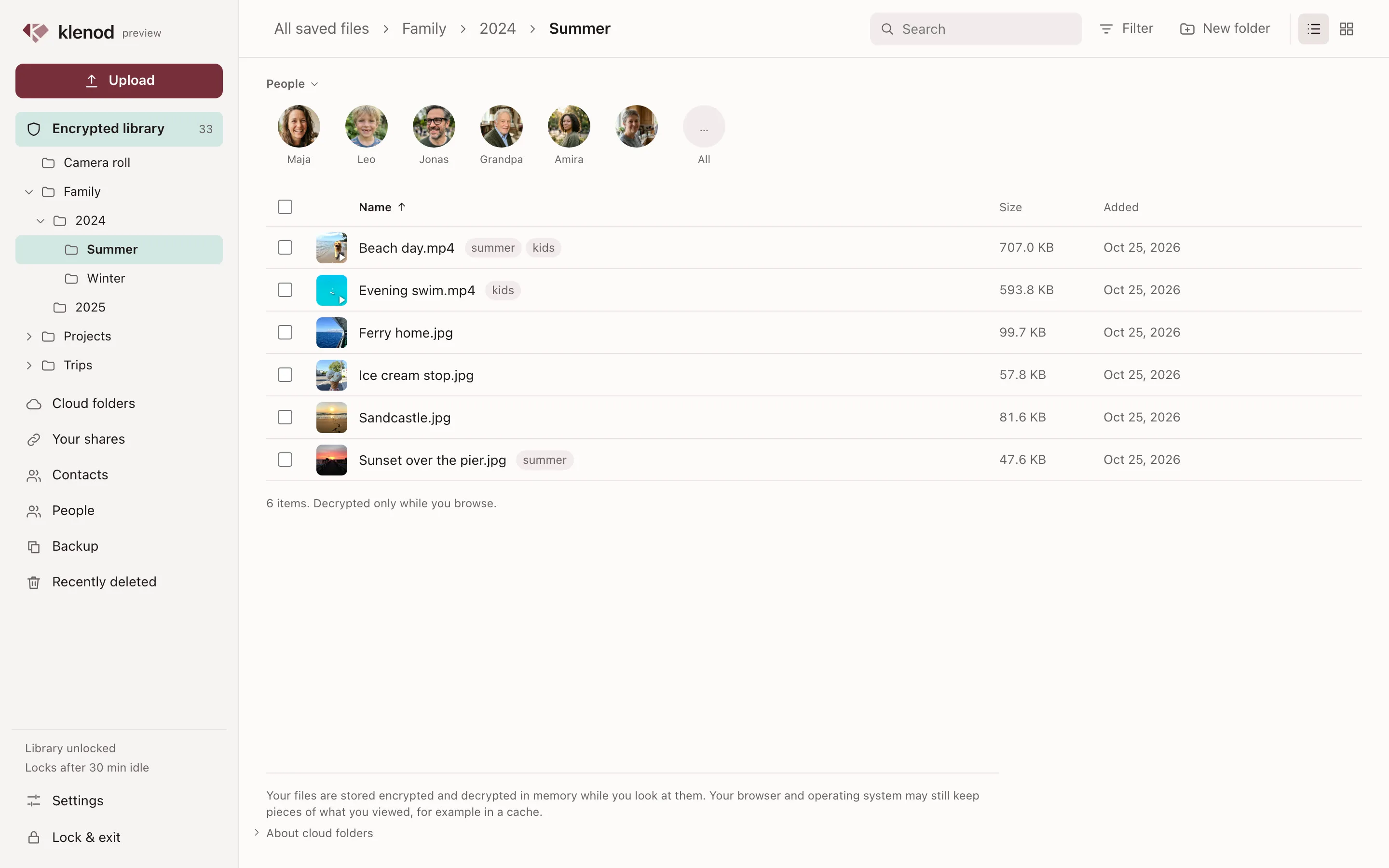
The library on a Mac. The files are encrypted on disk and decrypted in memory, only while you look at them.
Why Klenod
Own it
Your library is a folder you choose, on your Mac, an external drive or your own S3 storage. Keep a second copy somewhere else. You don't need a Klenod account.
Watch privately
Videos play from the encrypted copy, decrypted in memory. Klenod doesn't save a decrypted file to Downloads or a temporary folder to play it.
Bring it together
The album a friend put on MEGA, the wedding film that came by WeTransfer, a Proton Drive folder from a client. Keep them in one library.
Leave anytime
The library format is documented and opens offline. If Klenod disappeared tomorrow, your photos would still open.
Keep a copy of what people send you.
Links from WeTransfer and similar services expire, and shared folders get taken down. The copy you keep in Klenod stays.
Paste the link. The folder opens in Klenod, with its subfolders and previews.
Look first. Play videos and flip through photos before you decide.
Keep a copy. Pick files and back them up into your encrypted library, checked as they arrive.

Watch without leaving copies around.
Klenod plays videos straight from the encrypted library. The library locks after a while without use, and when your Mac goes to sleep. By default its window doesn't show up in screenshots or screen sharing, and ⌃⌥⌘L locks it from any app.
Older formats like WMV and FLV play too. Klenod converts them as you watch, with nothing to install.
- On screen. Only while you watch
- Decrypted in locked memory. A few pieces at a time, kept out of swap
- Your library on disk. Stays encrypted, with no decrypted copies saved
Share with one person, not the internet.
Send an encrypted link to a file, a folder or an album. Each person gets their own link, with an end date and an optional password, and you can stop sharing at any time. You can also send a request link, so someone can drop files straight into your library.

Find the people in your photos. Nothing leaves your Mac to do it.
Most photo apps recognise faces on their servers. Klenod does it on your Mac. It groups the faces in your photos and videos by person, so you can name someone, merge two groups that are the same person, and pick them to see every photo they're in.
- Off until you turn it on
- You choose People in Settings, for each library.
- Done on your Mac
- The face model comes with the app, and the part that runs it is blocked from the internet.
- Kept encrypted
- What it finds, and the names you give, stay inside your encrypted library and are never in a share. How it works


Faces are found on your Mac, with nothing sent over the internet.
What stays protected.
- Your video. Lake at dusk.mov, 22 MB
- Cut into pieces. Up to 4 MiB each: five full, one short
- Each piece sealed. XChaCha20-Poly1305. Names, folders, tags, dates and places too
- What your storage, or a copy, holds. Sealed pieces, their sizes, when they change
Klenod doesn't hide you from the services you open links from, and if you forget your passphrase without a recovery key, no one can open your library, us included.
Anyone can read the code and check. Read the security overview · Source code
Comparing it with Cryptomator, VeraCrypt or the Photos Hidden album? See how they compare, and when another tool is the better choice.
Promises
What stays with you
What we never have
Your passphrase
Never: An account to open your library
What you do in the app
Never: Analytics, crash reports
The links and storage you choose
Never: A server of ours
Your library, free to open
Never: A paywall
A documented format, an open-source core
Never: Lock-in
Questions
Short answers here. The rest are on the FAQ page.
What is Klenod?
Klenod is an encrypted library for your photos and videos, on your Mac. You can open links people send you from MEGA, Proton Drive, WeTransfer, Yandex Disk and other services, watch what's inside without downloading it, and keep the files that matter in a library only your passphrase opens.
What if I forget my passphrase?
If you made a recovery key, choose Forgot your passphrase? when you open the library, and enter the key to set a new passphrase. Without a recovery key, the library can't be opened, because Klenod keeps no copy of either. Make one in Backup, write it down by hand, and keep it with your recovery sheet, apart from the library.
What happens to my library if Klenod goes away?
It stays yours. The library is a folder you control, it opens offline, and its format is documented. The code that encrypts, stores and restores a library is open source under the MPL-2.0. That includes an open-source build of the klenod command-line tool, which opens, backs up, verifies and exports a library without the rest of Klenod. Your files never depend on us being around.
Get Klenod when it's ready.
It's in preview on the Mac now. Leave your email and we'll write once, on the day you can download it.
One email when the Mac app is ready. No tracking. How we handle it.